

Almost every enrollment and marketing leader has heard some version of the same prediction: AI is going to swallow the college search as we know it. It’s been on conference slides and in vendor pitches for two years now, and it’s driving a lot of fear about what happens to recruitment next.
Those claims were (what I would call) unsubstantiated. The whole prediction rested on one assumption: that Gen Z, as digital natives, would be AI’s earliest and most eager adopters. Nobody stopped to look at who this generation is, morally and socially, before putting all of our eggs in that basket.
When you do look, the picture changes. This is a generation that cares about the planet, watches their money closely, and is quick to distrust institutions that don’t share its values. That being said, the generation of early adopters isn’t adopting. According to our research with more than 8,600 high school students, AI use in the college search has held flat at 45 to 47%, and 65% of students use AI rarely or never in their search. Only 5% start their questions with an AI tool, while 57% still go to a college’s website first.
That doesn’t make the drop in organic traffic you’re likely seeing any less real. And candidly, a lot of students use AI without ever choosing to (or maybe even realizing it). Search Google and an AI-generated answer shows up above the links, and Gemini is built right into Chrome and Android phones, so fewer students click through from search results.
But here’s a silver lining: these students are still showing up to check. 67% double-check anything important AI tells them, and your website is where they check. That makes your website the source of truth for AI search engines and for the students fact-checking them, and out-of-date information means both get it wrong.
So the sky isn’t falling. It’s not as bad as expected, and you still have time to build momentum.
To help, we pulled the AI search data from the 2026 Enrollment Engagement Report, which surveyed 2,800+ juniors and seniors in December 2025, and the 2026 Student Communication and AI Expectations Report, which surveyed 5,840 students from August to September 2026, into one place. So grab a cup of coffee, because today we’re going to LEVEL SET! Below you’ll find what’s actually happening, plus next steps you can bring to whoever controls your website, totally free of fear-mongering. Let’s go!
What are the biggest AI search trends for colleges heading into 2027?
The six biggest AI search trends for colleges and universities heading into 2027, based on Capture Higher Ed’s 2026 surveys of more than 8,600 high school students, are:
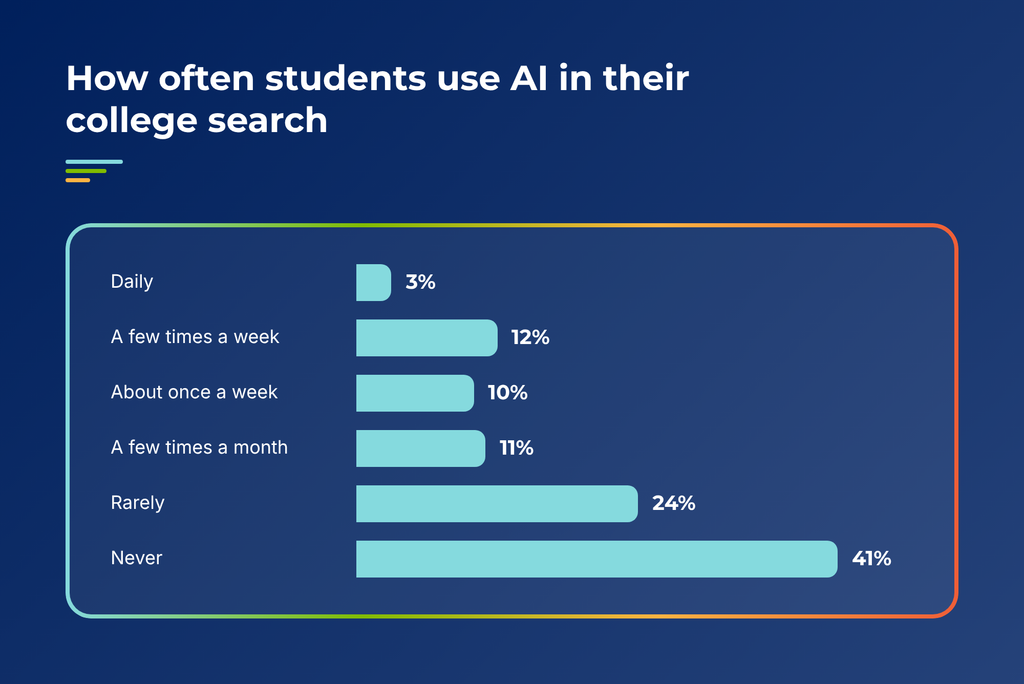
- Student AI search adoption has plateaued. 45% of high school students used AI in their college search in fall 2026, statistically level with 47% in December 2025. Only 3% use it daily, and 65% use it rarely or never.
- The college website is where students verify AI answers. 57% of students go to a college’s website first with a question, compared with 31% who start at Google and 5% who start at an AI tool.
- Students don’t trust AI answers about colleges. Only 2% of students trust AI answers completely, and 67% double-check important information.
- AI search introduces students to new colleges, but few follow up. 37% of students say an AI tool suggested a college they had never heard of, and only 15% looked into it seriously.
- Students use AI for tasks and want people for decisions. Across eight enrollment tasks, students preferred a real person every time, from 79% for explaining financial aid to 63% for a simple deadline question.
- Colleges that use AI agents to contact students lose applications. 57% of students are less likely to apply to a college that uses AI agents to contact them.
Trend 1: AI search adoption among college-bound students has plateaued
The trend
Student AI search adoption has stalled. In Capture Higher Ed’s surveys, the share of high school students using AI in their college search moved from 47% in December 2025 to 45% in fall 2026, and most students who use it only dip in occasionally.
The data
In Capture’s fall 2026 survey of 5,840 high school students, 45% used an AI tool during their college search. That is statistically level with the 47% we measured in December 2025. Depth of use is where it gets interesting:
Among the tools, ChatGPT leads at 36%, followed by Google Gemini at 25%, a college’s own chatbot at 12%, Microsoft Copilot and Claude at 5% each, and Perplexity at 1%.
If you’ve seen much higher AI adoption numbers in other studies, check the question. Many measure whether teens have ever used AI for anything. These numbers measure AI use in the college search specifically.
What to do about it
Start by finding out what AI tools are telling students about you right now. It’s free, and it tells you where to spend your time for every other step in this post.
Time investment: About half a day to set up, then an hour each quarter.
Step 1: Write your test questions (1 hour). Pull 10 to 15 questions from your admissions inbox, chat transcripts, and counselors. Write them in the exact words students use. Include both branded questions (“Does [Institution] offer direct admissions?”) and unbranded ones (“best nursing programs in Ohio”).
Step 2: Run them in ChatGPT and Gemini (1 to 2 hours). Those two tools cover most student AI use. In a spreadsheet, log one row per question with four columns: whether you were mentioned, whether the information was right, which competitors showed up, and which sources were cited.
Step 3: Turn wrong answers into a fix list (30 minutes). Every wrong answer traces back to a page somewhere, whether that’s your site, an old PDF, or a directory listing. Write down the cited URL next to each error. That list is your to-do list for Trends 2 and 3.
Step 4: Rerun it every quarter (1 hour). Use the same questions and the same spreadsheet so you can see what moved.
One budget note before you move on: with only 3% of students using AI daily, a new AI ad line or a chatbot overhaul shouldn’t jump ahead of your email, mail, and website basics.
Trend 2: The college website is where students verify AI search answers
The trend
Students treat AI search as a starting point and the college website as the final word. Whatever ChatGPT or Gemini tells them about your institution, they go to your website to confirm it. Your site now serves two readers at once: the student checking the AI’s work, and the AI tool pulling answers from your pages.
The data
When students have a question about a college, here’s where they look first:
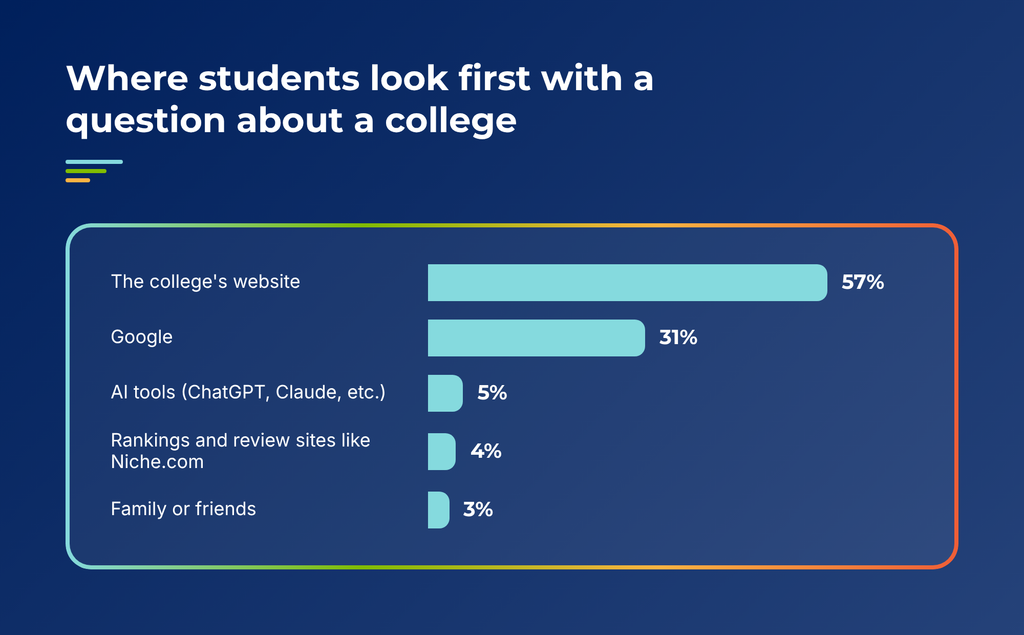
Put three numbers side by side and the pattern is clear. 45% of students use AI in their search, 67% double-check what it tells them, and 57% go to the college’s website first. Every AI answer about your institution generates a verification visit, and your site either confirms the machine or corrects it.
Capture’s December 2025 survey showed the same role from a different angle. At the decision stage, 42% said the college website built their confidence, acting as the reference point they return to when validating what they heard elsewhere.
What to do about it
Search optimization and AI optimization are now the same job. The pages students verify are the same pages AI tools quote, so fix those first.
Time investment: About 30 minutes per page. Start with five pages.
Step 1: Find your verification pages (30 minutes). In GA4, build an exploration filtered to sessions where the source contains chatgpt.com, gemini.google.com, perplexity.ai, or copilot.microsoft.com, and sort by landing page. If AI traffic is still too thin to show a pattern, use your tuition page, financial aid page, admissions requirements page, and your two most-visited program pages.
Step 2: Rewrite the first two sentences of each page (30 minutes per page). Hold every page to one test: if a student read only the first two sentences, would they have their answer? On a tuition page, that means something like “Tuition at [Institution] is $X for 2026–27. Most first-year students receive aid, and the average net price is $Y.” Put the detail underneath.
Step 3: Date-stamp every page with a number on it (5 minutes per page). Add a visible “last updated” date to every page listing tuition, deadlines, or requirements. It’s a credibility signal for students and AI tools alike.
Step 4: Hunt down stale PDFs and microsites (2 to 3 hours). Search Google for site:yourdomain.edu deadline filetype:pdf, then do the same for tuition. Old viewbooks and campaign microsites are where most outdated numbers live. Redirect them or take them down.
If you want to go further with FAQ sections and schema markup, I walk through both step by step in [link: GEO blog].
Trend 3: Students don’t trust AI answers about colleges
The trend
High school students are skeptical of what AI search tells them about colleges. They use it, they hedge it, and they click through to the sources. “Helpful, but…” is the most common sentence structure in what they wrote about AI.
The data
- 2% trust AI answers completely. 67% double-check important information. 21% don’t trust AI at all.
- 71% look at the sources AI cites, at least for important information (28% every time, 43% sometimes).
- In 3,794 written responses about AI in their search, 17% were clearly positive, 28% positive with conditions, and 5% negative, with the rest neutral or not using it.
The conditions students attached were always the same three: double-check it, use it early in the search, and never let it make the decision. As one student put it: “AI is helpful for broad and general information, and giving me a baseline for research. However, it’s just that, a baseline, and it’s important that I do research on my own from official websites.”
What to do about it
When 71% of students click through to the sources AI cites, every place your facts live has to say the same thing.
Time investment: One day for the first audit, then 2 to 3 hours each quarter.
Step 1: Build a fact sheet (1 hour). Make a spreadsheet with one row per fact: tuition and fees, average net price, application deadlines, test-optional status, enrollment size, student-faculty ratio, and your full program list. Add one column per place those facts show up: your admissions, aid, and program pages, plus Niche, College Navigator, Common App, and your Google Business Profile.
Step 2: Add the sources AI actually cited (1 hour). Go back to the test log from Trend 1 and add a column for every URL ChatGPT or Gemini cited. These are the pages students are clicking to fact-check, so they get checked first.
Step 3: Fix every contradiction in one pass (3 to 4 hours). Pick one format and stick to it everywhere (“$42,500” or “$42.5K,” not both). Update the stale numbers, and request corrections from third-party sites where you can’t edit directly. You will find contradictions. Most institutions do.
Step 4: Give it an owner (15 minutes). Put a recurring quarterly meeting on one person’s calendar to rerun the sheet. Without a name attached, this audit happens once.
Trend 4: AI search introduces students to new colleges, but few follow up
The trend
AI tools do put unfamiliar institutions in front of students. Few of those students follow up, and AI still ranks near the bottom of the channels that first get a college noticed.
The data
- 37% say an AI tool suggested a college they had never heard of. Only 15% looked into it seriously.
- In Capture’s December 2025 survey, AI tool suggestions and ads ranked at the bottom of what first made students pay attention to a college, with fewer than 1 in 10 students citing them.
- Email (48%), mail, peer conversations, and the college website led for first attention, and those same channels led again at the decision stage.
What to do about it
You can’t buy your way into an AI recommendation. You can make it easier for AI tools to find you and easier for students to take a next step when they do.
Time investment: About 3 hours to set up, then 30 minutes a month.
Step 1: See who AI recommends instead of you (30 minutes). Run five unbranded questions in ChatGPT and Gemini, built around your strongest programs and region, like “affordable nursing programs in Ohio” or “small colleges near Chicago with strong game design.” Note which competitors show up and which sources the AI cited for them. Those sources are where you need to be.
Step 2: Claim and update your third-party profiles (1 to 2 hours). Start with Niche and your Google Business Profile, since AI tools cite them most. Then check College Navigator and any state system directory. Make sure the facts match your fact sheet from Trend 3.
Step 3: Add a review ask to something you already send (15 minutes). Skip the review campaign. Add one line and a direct link to a post-visit email, your parent newsletter, or an admitted student event follow-up. Aim for a steady trickle, since a spike of reviews in one week looks manufactured.
Step 4: Check your landing pages for a next step (30 minutes). When a student does follow up on an AI suggestion, they land on a program page. Open your five most-visited program pages on your phone and confirm a clear next step shows up without scrolling: book a visit, talk to a counselor, or start an application.
Trend 5: Students use AI for college search tasks and want people for decisions
The trend
Students have built their own rules for AI: tasks yes, decisions no, verify always. They’ll use a chatbot to compare programs or organize deadlines. When the question gets personal, financial, or final, they want a person.
The data
In Capture’s December 2025 survey, students said they preferred AI for tactical work like comparing majors, learning basic facts, and getting quick scholarship answers, while 83% still said they would rather get answers from a real person. This year, we tested eight enrollment tasks, and a real person won every one:
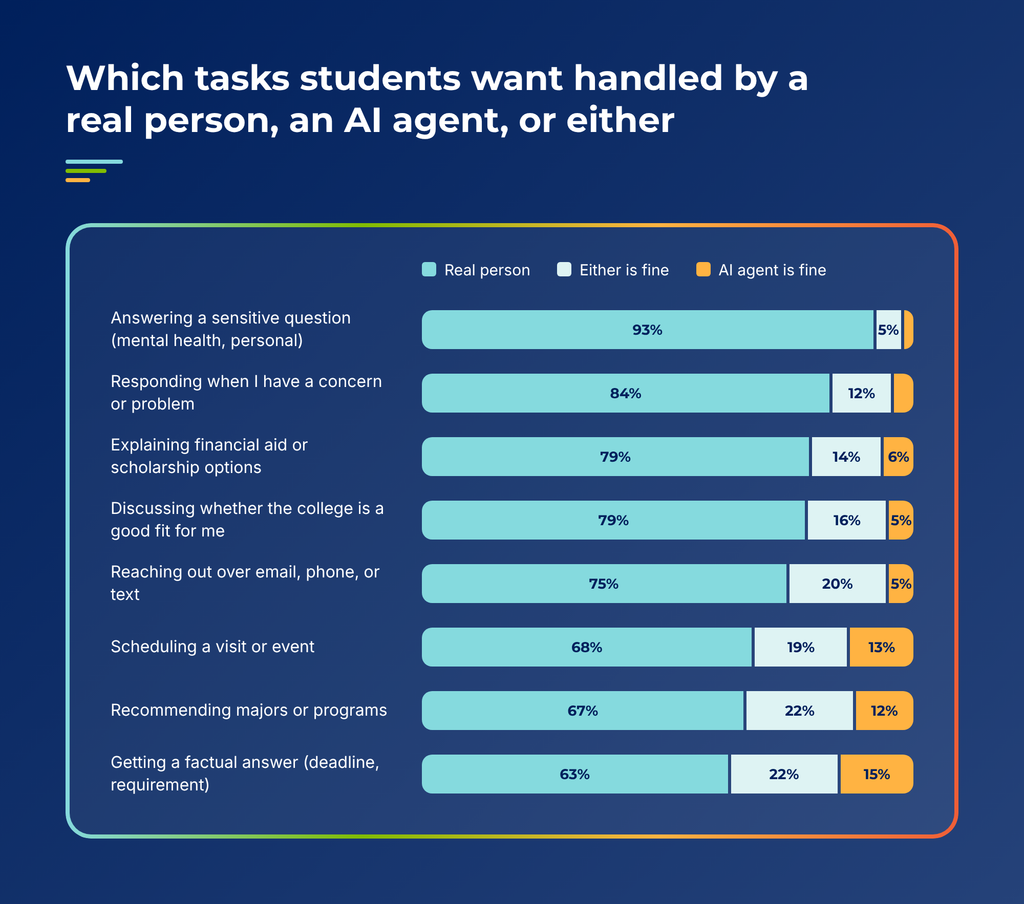
Even a factual answer about a deadline drew 63% for a person. The AI agent never cleared 15% on any task. Who starts the conversation matters too: discomfort with an AI agent sits at 20% when the student initiates and jumps to 34% when the AI makes first contact.
What to do about it
Students already told you where the line is. Match your website chatbot and your staffing to it.
Time investment: About half a day, plus a conversation with whoever manages your chatbot.
Step 1: Sort 50 chatbot transcripts (1 hour). Pull your last 50 conversations and split them into two piles. Factual questions go in one pile (deadlines, requirements, how to apply). Personal ones go in the other (aid, fit, cost for their family, anything about a concern). The size of the second pile tells you how much your bot is handling that students want a person for.
Step 2: Write your handoff rules (1 hour). Any question about financial aid, fit, or a concern routes to a person. List the trigger words from your second pile, like “afford,” “scholarship,” “worried,” and “not sure,” and give them to whoever configures the bot. Set a response-time target for the human follow-up, such as one business day.
Step 3: Stop the bot from starting the conversation (15 minutes). Discomfort with AI jumps from 20% to 34% when the AI makes first contact. If your chatbot pops open and greets students on its own, switch it to wait for a click. Keep a “talk to a person” button visible from the first message.
Step 4: Put real counselors on your aid and program pages (2 hours). Add a name, photo, territory, and a direct email or booking link. These are the same pages students land on to verify AI answers, so a real person should be one click away.
Trend 6: Colleges that use AI agents to contact students lose applications
The trend
Students are fine with AI they choose to use. They push back hard on AI that colleges and universities use on them. And because 60% assume half or more of college messages are AI-written, your outreach now gets read as AI until it proves otherwise.
The data
- 57% are less likely to apply to a college that uses AI agents to contact students (18% much less, 40% somewhat less). Only 2% say it makes them more likely.
- Shown the same message from two colleges, 88% chose the one a person wrote. 2% chose the AI-written one.
- 55% view a college more negatively when a message merely feels AI-generated, consistent with roughly 60% in December 2025.
- When a college is clearly using an AI agent, 31% lose interest, 21% ignore it, and 8% unsubscribe or block. Less than 1% become more interested.
The tells students watch for most are generic or vague wording and sounding identical to other colleges. Formatting quirks like em-dashes and emoji rank much lower. That means a generic message written entirely by a person still reads as AI.
What to do about it
Most enrollment teams don’t have a full picture of where AI already touches students. Start there.
Time investment: About 3 hours, plus a conversation with whoever owns your outreach tools.
Step 1: Inventory every AI touch (1 hour). List every place AI writes to or contacts a prospective student: AI-drafted emails, texting agents, outbound chatbot sequences, auto-replies. Ask admissions, financial aid, and marketing separately, because these tools often get bought by different teams.
Step 2: Put a person in front of anything AI-initiated (ongoing). If an AI agent makes first contact anywhere on your list, change the workflow so AI drafts, prioritizes, or times the message and a person reviews and sends it.
Step 3: Score your last ten sends against the AI tells (1 hour). Mark each email yes or no on five tells: generic or vague wording, could have come from a competitor with the logo swapped, overly polished, over-the-top enthusiasm, and skips the student’s actual question. Anything with two or more yeses gets rewritten.
Step 4: Run a holdout test before you scale (setup: 1 hour). If an AI agent stays in place, split one segment. Half get human outreach, half get the agent. Compare application rates at the end of the cycle. 57% of students say AI agents make them less likely to apply, so test that against your own funnel before you expand.
Frequently asked questions about AI search trends for colleges
What are the biggest AI search trends for colleges heading into 2027? Student AI adoption has plateaued at 45 to 47%, students use the college website to verify AI answers, only 2% trust AI completely, AI rarely leads students to new colleges, students want people for big decisions, and 57% are less likely to apply when a college uses AI agents to contact them. These trends are based on Capture Higher Ed’s 2026 surveys of more than 8,600 high school students.
Is AI search reducing traffic to college websites? AI-generated answers at the top of Google and tools like Gemini mean fewer students click through from search results, so many colleges and universities are seeing organic traffic drop. Students still visit to check what AI told them: in Capture’s fall 2026 survey, 57% go to a college’s website first with a question, and 67% double-check important AI answers.
How many high school students use AI to search for colleges? 45% of high school students used an AI tool during their college search in fall 2026, according to Capture’s survey of 5,840 students. That’s statistically level with 47% in December 2025. Only 3% use AI daily for their search, and 65% use it rarely or never.
Which AI tools do college-bound students use most? ChatGPT (36%) and Google Gemini (25%) lead, followed by a college’s own chatbot (12%), Microsoft Copilot (5%), Claude (5%), and Perplexity (1%).
Do students trust AI answers about colleges? Mostly no. Only 2% trust AI answers completely, 67% double-check important information, and 21% don’t trust AI at all. 71% look at the sources AI cites for important information.
Where do students go first with a question about a college? 57% go to the college’s website first. 31% start with Google, 5% with an AI tool, 4% with rankings and review sites, and 3% with family or friends.
How should colleges and universities optimize for AI search? Treat your website as your AI answer source. Lead program pages with clear answers, publish plain-language cost information, keep one current source for deadlines, write FAQs in students’ own words, and use structured data. The pages students use to verify AI answers are the same pages AI tools quote.
Should colleges use AI agents to contact prospective students? The data says to be careful. 57% of students are less likely to apply to a college that uses AI agents to contact them, and 88% prefer a message written by a person. Students are far more comfortable with AI when they start the conversation, such as a website chatbot.
Can AI tools help students find new colleges? Sometimes. 37% say AI suggested a college they had never heard of, but only 15% looked into it seriously. Email and mail still lead for first getting a college noticed.
What are GEO and AEO for colleges and universities? GEO (generative engine optimization) means creating clear, authoritative, structured website content so AI tools like ChatGPT, Gemini, and Perplexity cite and recommend your institution in their answers. AEO (answer engine optimization) means structuring content to win direct answers, featured snippets, and voice results. For colleges and universities, both depend on accurate, current, and well-organized program, cost, and deadline pages.
The bottom line on AI search for colleges: your website is still the front door
AI search is one more place students look, and they treat it as a rough draft. The work still happens on your website, in your inbox, in the mailbox, and in conversations with real people. The institutions that do well with AI search will be the ones with the clearest, most accurate websites and a person ready when a student raises their hand.
That’s the same model students described for colleges themselves: AI doing the work in the background, and a human showing up to the conversation. Capture’s platform works that way. It identifies prospective students in the dark funnel, scores their engagement, and surfaces the moments when a counselor should reach out with the right message.
About the data
- The 2026 Student Communication and AI Expectations Report surveyed 5,840 high school students, 98% of them seniors, in August and early September 2026. Every U.S. state was represented. Margin of error is +/-1.3 percentage points at the 95% confidence level for full-pool questions. Later questions drew roughly 4,250 to 4,900 responses.
- The 2026 Enrollment Engagement Report surveyed 2,800+ high school juniors and seniors from December 8 to December 31, 2025, recruited through Scholarships.com. Margin of error is roughly +/-2 percentage points at the 95% confidence level.
Year-over-year comparisons are directional. The two pools differ in grade mix and timing, and some question wording changed.